Does More Thermal Paste Mean Better Cooling? 5 Common Mistakes Beginners Make and How to Apply It Correctly
Does More Thermal Paste Mean Better Cooling? 5 Common Mistakes Beginners Make and How to Apply It Correctly
When building a PC or replacing your CPU or GPU cooler, you’ll inevitably come across a small but critical component — thermal paste (also known as thermal grease, heat sink compound, or thermal interface material). It may look insignificant, but this material plays a vital role in ensuring your CPU or GPU runs cool and stable.
However, many beginners make serious mistakes when applying it — the most common one being the belief that “the more paste, the better the cooling.” Is that really true? Let’s break down the facts and learn how to apply thermal paste properly.
⚠️ Myth #1: Thicker Thermal Paste Layer Means Better Heat Dissipation
Wrong — it’s actually the opposite!
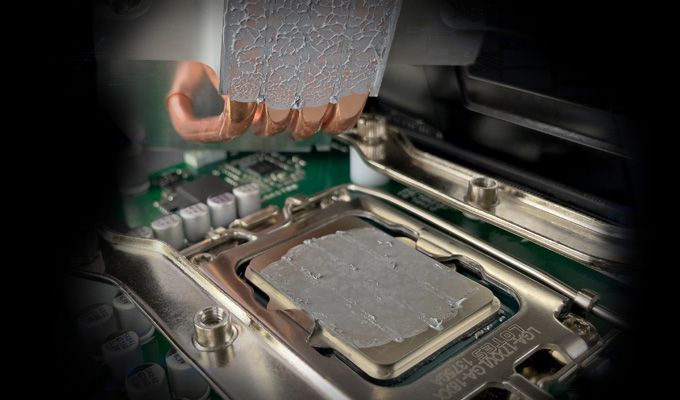
The main purpose of thermal paste is to fill microscopic gaps and imperfections between the CPU’s heat spreader (IHS) and the cooler’s base. These air gaps act as thermal insulators, preventing heat from transferring efficiently. The paste replaces that trapped air, creating a more effective thermal path.
But if you apply too much, the layer becomes too thick — and since thermal paste conducts heat far worse than metal (typically 2–8 W/m·K vs. copper’s 400 W/m·K), you actually create an additional thermal barrier. The result? Higher, not lower, temperatures.
✅ Ideal rule: Apply a thin, even layer — just enough to fill the microscopic imperfections.
⚠️Myth #2: Any Cheap Thermal Paste Will Do
Not all thermal pastes are the same. Their performance varies greatly depending on composition and thermal resistance.
- Thermal Resistance: The lower, the better. Gamers, overclockers, and high-performance users should look for premium pastes with low thermal resistance.
- Composition: Common types include silicone-based, ceramic-filled, and metal-filled (e.g., silver compounds).
Note: Liquid metal offers the best thermal conductivity but is electrically conductive and risky for beginners — it can short out components. - Electrical Insulation: Most standard pastes are non-conductive, but always double-check, especially for compact devices or laptops.
⚠️Myth #3: The Application Method Doesn’t Matter
The way you apply thermal paste directly affects cooling performance.
- Spread Method: Use a small spatula or card to evenly spread a thin layer across the entire surface.
- Dot or X Method: Place a small pea-sized dot (or X) in the center — pressure from the cooler will spread it out.
✅ Key principle: Less is more. Let the pressure of the cooler evenly distribute the paste across the CPU surface.
⚠️ Myth #4: Apply Once, Never Replace
Thermal paste degrades over time — it can dry out, harden, or lose its thermal conductivity. If you notice unusually high CPU or GPU temperatures even after cleaning the fans and heatsinks, your paste may need replacing.
Recommendation: Reapply thermal paste every 1–2 years, especially in systems that run under high loads or in warm environments.
⚠️ Myth #5: No Need to Clean Before Applying New Paste
Absolutely wrong! Before applying new paste, you must thoroughly clean off old residue and dust from both the CPU and heatsink.
Use high-purity isopropyl alcohol (IPA) or a specialized cleaner, and wipe with lint-free materials (like coffee filters or microfiber cloths). Any leftover residue can prevent proper contact and reduce thermal performance.
Correct Thermal Paste Application — Step-by-Step
- Clean: Completely clean the CPU heat spreader and heatsink base.
- Apply a small amount: A pea-sized drop is usually enough. Too much increases thermal resistance and risks overflow.
- Mount carefully: Align the cooler properly, press down evenly, and secure it in place.
- Optional: Gently twist the cooler slightly to remove trapped air bubbles (do not lift it afterward).
Final Thoughts
Thermal paste is one of the most critical yet misunderstood components in a PC’s cooling system. The golden rule is simple: thin, even, and clean.
Proper application ensures optimal heat transfer, lower temperatures, and longer hardware life. Whether you’re building a gaming PC, maintaining a server, or cleaning your console, mastering this small but essential detail can significantly improve your system’s cooling performance and reliability.
A Comprehensive Study on Thermal Interface Materials
Related Article